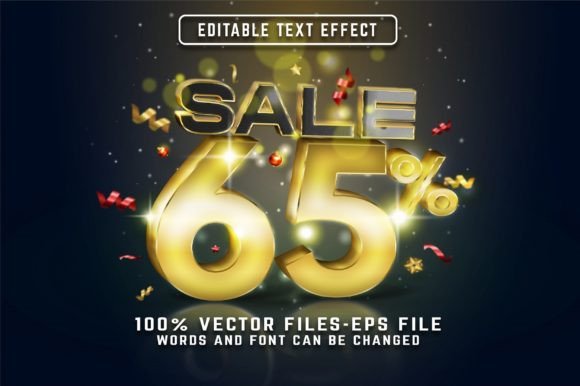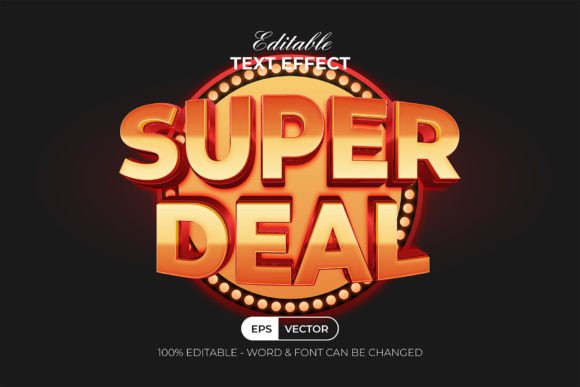
Super Deal Text Effect 3D Golden Style
The Super Deal Text Effect 3D Golden Style is a powerful Adobe Illustrator text effect that brings professional-grade design to your projects with minimal effort. Whether you're creating marketing materials, social media graphics, educational content, or branding assets, this tool can elevate your visual storytelling in an instant. It's not just about making text look good—it’s about making it stand out and communicate value effectively.
Ease of Use Meets Professional Results
One of the standout features of this text effect is its ease of use. Instead of spending hours adjusting lighting, shadows, and colors manually, you simply select your text or shape and apply the effect from the Graphic Styles menu. This streamlined approach makes it ideal for both beginners and seasoned designers who want to save time while maintaining high-quality output.
Behind the scenes, the effect is built using well-organized layers, which means you’re never left guessing how it works. You can easily tweak elements like color, size, or position to match your project’s specific needs. And because it uses RGB color mode, it ensures vibrant and consistent results across digital platforms.
Key Features That Make It Stand Out
- 100% Editable: Every element of the text effect is customizable—change fonts, colors, sizes, and more without breaking the style.
- Graphic Style Integration: Apply the effect instantly through the Graphic Styles panel in Adobe Illustrator CC or later versions.
- High-Quality Files: Comes with .AI and .EPS files, plus a JPEG preview for quick reference.
- Free Fonts Included: The package includes all necessary fonts so you don’t have to worry about licensing issues.
- Read Me File: Detailed instructions are included to help users get started right away.
Real-World Applications Across Industries
This text effect is incredibly versatile and finds its place in a wide range of fields. Here are some practical applications where it shines:
Marketing and Advertising
In promotional materials such as banners, posters, and social media posts, the golden 3D text effect can create a sense of luxury and urgency. For example, when designing a flash sale graphic, applying the Super Deal Text Effect 3D Golden Style to headlines like “Limited Time Offer” or “Buy Now” can draw attention and enhance readability, making your message more compelling to potential customers.
Business Presentations and Reports
Professionals preparing business reports or presentations often need to highlight key data points. Using this effect on headings or important figures adds a polished, professional look without overcomplicating the design. It helps separate critical information from the rest of the content, improving user experience and comprehension.
Education and E-learning
For educators or e-learning developers, the effect can be used to emphasize titles of modules, chapters, or interactive elements in course materials. A title like “Module 3: Advanced Techniques” styled with the golden 3D effect can make learning resources appear more engaging and organized.
Creative Projects and Branding
Designers working on logos, book covers, or website headers will appreciate how this effect can add depth and richness to their work. It’s especially effective for brands that want to convey elegance or premium quality. Think of a product name styled with the golden backlight version to give it a striking presence in print or digital formats.
Digital Content Creation
Bloggers, publishers, and digital marketers can use the Super Deal Text Effect 3D Golden Style to enhance infographics, newsletter headers, or YouTube thumbnails. In these contexts, the red backlight variation can add a pop of contrast and energy, making your content more eye-catching in crowded feeds or search results.
Freelance Work and Client Deliverables
As a freelancer, time is money. This effect allows you to quickly produce visually appealing designs for clients without sacrificing quality. Whether you're working on a logo for a new startup or a promotional poster for a local event, having a ready-to-use effect in your toolkit can speed up the process significantly.
Why Choose the Super Deal Text Effect?
There are many text effects available online, but what sets the Super Deal Text Effect 3D Golden Style apart is its balance between simplicity and sophistication. Unlike some complex effects that require advanced knowledge to modify, this one offers intuitive editing options that allow even those with basic Illustrator skills to achieve impressive results.
Additionally, the inclusion of a red backlight option gives you creative flexibility. You can choose the golden glow for a classic, upscale feel or switch to the red backlight for a bold, energetic appearance. This dual functionality means one purchase serves two different aesthetic needs, maximizing value for users.
Boost Engagement and Communication
Text is often the primary way we communicate ideas. When styled properly, it becomes more than just words—it becomes a visual anchor. The 3D golden style can help your text command attention, especially in environments where visuals are key to conveying a message. This is particularly useful in UI/UX design, where clear typography combined with subtle effects can guide users and improve interaction.
Entrepreneurs and startups looking to build brand identity can benefit greatly from this. Applying the effect consistently across various touchpoints (websites, packaging, ads) helps establish a recognizable visual theme, reinforcing brand perception and trust.
Considerations for Implementation
Before integrating the Super Deal Text Effect into your workflow, consider the following tips:
- Understand Your Audience: The golden style may suit luxury or formal branding better than casual or minimalist themes. Evaluate if the effect aligns with your target audience’s expectations and preferences.
- Test on Different Backgrounds: Because it includes a red backlight, ensure the background doesn’t clash with the colors used. Try it on light, dark, and patterned surfaces to see how it performs.
- Stay Consistent: If you plan to use this effect repeatedly, develop a set of guidelines to maintain consistency across your designs. This is crucial for branding purposes.
- Check Compatibility: Confirm that you’re using Adobe Illustrator CC or a newer version before downloading. While the file format is widely compatible, always verify performance on your system.
- Layer Organization: Since the files come with well-structured layers, take advantage of this by customizing only the parts you need. This keeps your design clean and manageable.
Practical Use Cases
Let’s explore some real-world examples:
- Product Launches: Highlight the product name with the golden 3D text effect to create a sense of exclusivity and prestige.
- Website Headers: Use the red backlight variant for call-to-action buttons or section titles to increase visibility and click-through rates.
- Event Posters: Emphasize dates, locations, or special announcements with this effect to capture viewer interest immediately.
- Social Media Templates: Apply it to Instagram stories, Facebook banners, or Twitter headers to maintain a cohesive and stylish brand image.
- Print Materials: From brochures to magazine covers, the golden style can bring a timeless appeal to any printed piece.
Maximizing Value for Creators and Business Owners
For creators and small business owners, efficiency and aesthetics are equally important. This text effect saves time by eliminating the need to build each style from scratch while ensuring that your final output looks professionally designed. The ability to edit each component means you can tailor the effect precisely to fit your creative vision or client requirements.
Another benefit is that it supports a variety of fonts. With 100 editable text options, you’re free to experiment with typefaces that best represent your brand or message. This adaptability is essential for producing unique and personalized designs.
Moreover, the fact that it’s a font effect rather than a font itself means you avoid copyright issues. Many designers struggle with finding the perfect font that’s both stylish and legally usable; this solution sidesteps that problem entirely by offering a pre-built effect that works with any standard font.
Recommendations for Best Results
To get the most out of the Super Deal Text Effect 3D Golden Style, follow these recommendations:
- Use it sparingly to avoid overwhelming the design. Let the effect shine on key phrases or headings.
- Combine it with other subtle effects like gradients or drop shadows for added depth.
- Ensure proper spacing and alignment when applying the effect to maintain readability.
- Export at high resolution for print work and optimize for web use separately to preserve quality.
Final Thoughts on Usability and Design Impact
The Super Deal Text Effect 3D Golden Style is more than just a shortcut—it’s a strategic design asset. Its blend of professional appearance and user-friendly structure makes it a go-to choice for anyone who wants to enhance their Adobe Illustrator projects quickly and effectively. By leveraging this effect, you can focus more on creativity and less on technical execution.
Whether you're crafting a presentation for investors, designing a logo for a client, or building content for your blog, this effect has the potential to transform your work. As long as you understand the context and apply it thoughtfully, the Super Deal Text Effect 3D Golden Style can become an invaluable part of your design process.
Ready to take your illustrations to the next level? Consider adding this effect to your collection and start experimenting today. You might just find that it becomes one of your most-used tools in Adobe Illustrator.