Spruce Tree 3D Papercraft: A Festive Addition to Your Holiday Decor
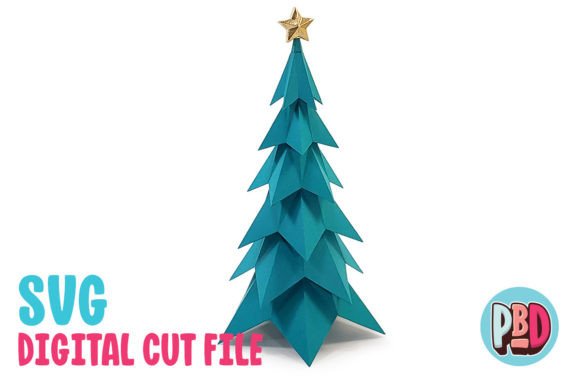
The Spruce Tree 3D Papercraft is a stunning and creative way to bring the spirit of the season into your home. This 16-inch tall model offers a realistic look that can enhance any holiday display, whether you're decorating for Christmas, a winter gathering, or simply adding a touch of nature to your space. Its dimensions—8 inches wide, 8 inches deep, and 16 inches tall—make it an ideal size for mantels, shelves, or as part of a larger festive setup.
Designed with precision and care, this papercraft model is perfect for both seasoned crafters and those new to the world of 3D paper projects. The design requires 65 lb. cardstock or heavier, ensuring durability and a professional finish. While the materials are straightforward, the attention to detail in the design makes it a rewarding project that can be completed in a few hours with the right tools and guidance.
What’s Included in the Download
When you purchase the Spruce Tree 3D Papercraft, you receive a comprehensive set of digital files to get started. The download includes a ZIP file containing three essential components: an SVG cut file, a DXF cut file, and a PDF instruction manual. These files provide all the necessary resources to create your own spruce tree model at home.
The SVG cut file is compatible with popular cutting software such as Silhouette Designer Edition and above, as well as Cricut Design Space. This makes it easy for users who already have these tools to start crafting immediately. However, it's important to note that other software platforms have not been tested, so it's best to use the recommended programs for optimal results.
The DXF cut file is another option for those using Silhouette Basic Edition. While it may not offer the same level of precision as the SVG file, it still provides a viable method for creating the spruce tree. Users should be aware that DXF files may take longer to open in Silhouette Studio and may not appear as clean as SVG files. If possible, using the SVG version is recommended for the best outcome.
Setting Up Your Cutting Software
To ensure the DXF file works correctly in Silhouette Studio, it's crucial to adjust your preferences. Start by opening the Edit Preferences menu and navigating to the Import DXF section. From there, change the setting from “As-is” to “Centered.” This adjustment helps align the file properly and avoids potential issues during the cutting process.
While the SVG file is generally more user-friendly, some users may prefer the DXF format depending on their specific software setup. Regardless of which file type you choose, following these steps will help you avoid common pitfalls and ensure a smoother crafting experience.
Building Your Spruce Tree Model
Once you have the digital files ready, the next step is to print and cut out the pieces. The PDF instructions included in the download provide clear, step-by-step guidance to help you assemble the model. Whether you're working alone or with family and friends, these instructions make the process accessible and enjoyable.
Using 65 lb. cardstock or heavier ensures that the finished model is sturdy and long-lasting. This material choice also allows for better detailing and a more polished appearance. As you begin assembling the pieces, you'll notice how the design elements come together to form a lifelike spruce tree. The interlocking tabs and precise cuts make the construction process straightforward, even for beginners.
Enhancing Your Holiday Decor
The Spruce Tree 3D Papercraft is more than just a decorative item—it's a versatile addition to your holiday decor. Its realistic shape and texture make it stand out among traditional decorations, offering a unique and artistic touch to any space. You can place it on a table, hang it from a ceiling, or incorporate it into a larger scene with other papercraft models.
This model is especially useful for those looking to add a personal and handmade element to their holiday displays. Unlike mass-produced decorations, the Spruce Tree 3D Papercraft allows you to customize the colors, add embellishments, and tailor the design to fit your style. It's also a great project for teaching children about craftsmanship and creativity, making it a valuable activity for families during the holidays.
Practical Benefits of Using Spruce Tree 3D Papercraft
One of the key advantages of the Spruce Tree 3D Papercraft is its ease of use. The downloadable files eliminate the need for physical materials, saving time and reducing costs. Additionally, the ability to print and cut the design at home means you can create multiple copies or share the project with others without additional expenses.
For hobbyists and DIY enthusiasts, this model offers a fun and engaging way to spend an afternoon. It's also a great option for those looking to expand their papercraft skills, as it introduces techniques such as folding, gluing, and assembling complex shapes. The Spruce Tree 3D Papercraft is a practical and creative solution that fits seamlessly into modern crafting workflows.
Choosing the Right Materials and Tools
While the instructions mention using 65 lb. cardstock or heavier, you may want to consider other options based on your available resources. Thicker cardstock can provide extra stability, while lighter weight paper might be easier to work with for younger crafters. Experimenting with different materials can also lead to unique variations of the model, allowing for greater customization.
In terms of tools, a good pair of scissors, a ruler, and a glue stick are essential for most papercraft projects. For those using a cutting machine, ensuring that your blade is sharp and your settings are correct will help produce clean, accurate cuts. Investing in quality tools can make a significant difference in the final result, especially when working with detailed designs like the Spruce Tree 3D Papercraft.